Search This Blog

Monday, September 12, 2011

Data Dictionary in Documentum

It stores server-based information (rules) about objects and properties. These rules are allowed to be used for client/server web based development. The information in Data Dictionary is not used by the Content Server for its internal processing but by the client applications. The Content server only stores and retrieves information form Data Dictionary.
Data Dictionary Information about a object type is defined using the Documentum Composer. Before this information is used by the client application, it must be published to the repository. If you are using Documentum composer then it is automatically published. Publishing of the information creates/amends following three objects (types):
dmi_dd_common_info
dmi_dd_type_info
dmi_dd_attr_info
dm_DataDictionaryPublisher job is used to publish the information.

Wednesday, September 7, 2011

Error while Promoting a document to its next lifecycle state in WebTop

Scenario: Created a new LifeCycle for a custom object type (inherited from dm_document) using the Documentum Composer and installed it in the repository. Created a new document using the new type and applied the lifecycle to it.

When tried to promote the document to the next lifecycle state, got the following error:
Error in promoting the file [DM_POLICY_E_ERROR_0010]error: "BP transition script error. Details:Error saving the sysobject;[DM_ACL_E_CANT_CREATE_INSTANCE]error:"Cannot create an instance dm_4500000180002505_80000900 of template ACL Approved based on alias set Custom_App.

Reason: The ACL specified in the error message either does not exist or has some issue associated with it.
Solution: Create the ACL and try promoting the document again.

Note: For other possible Documentum (v 5.3) errors visit http://www.dmdeveloper.com/articles/programming/messages53.html

Thursday, September 1, 2011

Creating and Configuring a new Format in DA

Format objects define file formats. Content Server only recognizes formats for which there is a format object in the repository. When a user creates a document, the format of the document must be a format recognized by the server. If the format is not recognized by the server, the user cannot save the document into the repository.

The Content Server installation process creates a basic set of format objects in the repository. You can add more format objects, delete objects, or change the properties of any format object.

Let assume that we want to create a new format for the file format .MSF and files with this extension are plain text files.

To create a new format:
1. Navigate to Administration > Formats to access the Formats list page.
2. Select File > New > Format to access the New Format Info page.
3. Complete the properties for the new format.


4. Click OK to save the new format or Cancel to exit without saving the changes.
The system displays the Formats list page.

5. Add File extension in Windows so that when you edit a file of this format it open in the default editor. Follow the below steps:
Step (a).


Step (b).


Step (c).


Testing the newly created Format Object

Step 1: Login to the WebTop
Step 2: Add a new Format in Tools->Preferences->Format

Step 3: Go to your cabinet and select File-> Import
Step 4: Drag and drop a file with MSF extension or just add .MSF file and click ‘Next’. A dialog similar to the one shown below will appear on the screen:


Step 5: Click Next button and dialogue box contents are changed. These entries indicates that new format has been used for the extension of the document you are importing.


Step 6: Finish importing the document by clicking on ‘Finish’ button.

Editing MSF file

Step 1: Locate the MSF document you have just imported.
Step 2: Right click the file and choose ‘Edit’ from the context menu.
Step 3: As the file type MSF was associated with Notepad as an editor, the document being edited opens in the Notepad as shown below:
If the File association for MSF is not set, executing ‘Edit’ operations on MSF file shows following dialog box:

Docbase service startup issue

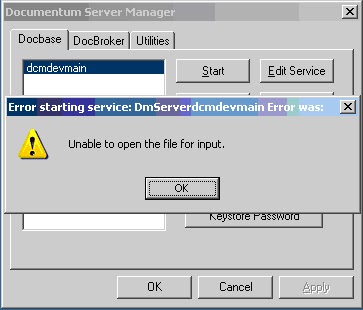
Scenario: Stop Docbroker and DocBase from Start->All Programs->Documentum Server Manager. Open the log file by clicking on ‘Viewlog’ button under ‘Docbase’ tab for viewing the log. Now started Docbroker and it started with out an issue. Now tried to start DocBase service and got the following error:

Reason: The log file is opened while trying to start the Docbase service.
Solution: Close the log file and try starting the Docbase service again. Service should start with out any problem.

Error while running a Job in Documentum Administrator (6.5)

Scenario: Running Job dm_Filereport does not execute properly and 'View Job Report' shows following report showing the error that caused Job to fail
FileReport Report For DocBase <DocbaseName> As Of 30/8/2011 09:45:38
Aborting--Job can't run in it's time window, please check the window_interval argument which is currently set to 60
Report End 30/8/2011 09:45:38

Solution: Follow the below procedure to fix the issue:
Step 1: Right click the Job and open its Properties window.
Step 2: Go to the 'Method' tab and click on the 'edit' link available in front of  'Arguments'
Step 3: Modify the parameter window_interval value to 1440 to give sufficient time for the job to execute.
Step 4: Close the Properties window and try to run the job again. It should work fine now.

Saturday, July 9, 2011

Digital Rights Management (DRM)

DRM is a method of controlling access to copyrighted material in available digital format. In other words, DRM is a shield around the digital content like videos and music to stop privacy. It is a digital management of rights.

In order to design and implement DRM systems, the following two architectures to be considered:

1). Functional Architecture
This covers the high-level modules of DRM system that together provide an end-to-end management of rights.

The DRM system can be modeled in three areas:
a). Intellectual Property (IP) Asset Creation and Capture This module manage the creation of content so it can be easily traded and includes asserting rights when content is first created.

b). IP Asset Management
To manage and enable the trade of content.

c). IP Asset Usage
To manage the usage of content once it has been traded.

These models needs to be complemented by the functional architecture that provides the framework for the modules to implement DRM functionality.

 2). Information Architecture
This covers the modeling of entities within the DRM system as well as their relationships.

DRM Vendors

Below are the some of the DRM vendors

Microsoft
Real Network
Macrovision
IBM
Seclore

Seclore - Information Rights Management
Seclore FileSecure’s IRM connector for IBM FileNet®  empower enterprises with the ability to robustly secure and monitor access to content and information within and outside of IBM FileNet® without any compromise to collaboration and way people work.
 
http://www.seclore.com/ibm_filenet.html


DRM from IBM

IBM has developed two solutions to enforce DRM at low level:
a). DRM-JVM
In this solution digital rights management has been enforced at Java virtual machine(JVM) level. DRM-JVM does not affect the non DRM solutions.

b). WebGuard
This solution enforces copyrights at the browser level.

Digital Asset Management (DAM)

DAM consists of management tasks related to storage, retrieval and distribution of digital assets. It also refers to the protocol for downloading, renaming, rating, grouping, maintaining and exporting files. The media asset management (MAM) mainly addresses audio, video and animation.

Read More